
Dreamy Lights Chrome Theme
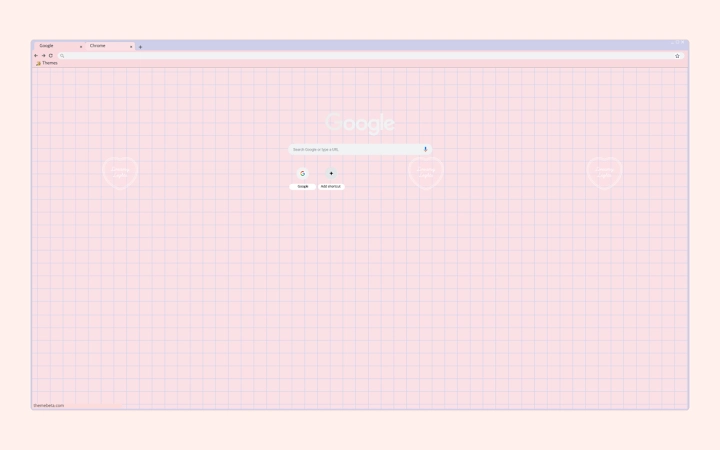
Download the latest version of Dreamy Lights Chrome Theme for a soothing browsing experience. This elegant desktop utility enhances your web interface with a warm, soft grid pattern and gentle color palette. Perfect for users who value both aesthetics and functionality, it’s ideal for note-taking sessions, creative work, or simply enjoying a visually calming online environment.
Designed for everyday users and digital creatives alike, the theme fits all screen resolutions without compromising clarity or layout. The developer, Dreamy Lights, focuses on crafting immersive visual experiences through subtle design elements. Whether you're working on a project, browsing social media, or reading articles, the theme creates a serene digital space that reduces visual fatigue.
It’s a lightweight, easy-to-apply enhancement that transforms your Chrome browser into a more inviting workspace.
Key Features & Capabilities
- Soft Color Palette – The theme uses warm, gentle hues to create a calming visual atmosphere, reducing eye strain during extended browsing sessions.
- Subtle Grid Pattern – A delicate, soft-colored grid overlays the browser interface, adding visual interest without distracting from content.
- Universal Screen Compatibility – Optimized to fit all screen resolutions, ensuring a consistent look across devices from laptops to desktop monitors.
- Lightweight Design – At just 1.5 MB, the theme loads instantly and consumes minimal system resources.
- Seamless Integration with Chrome – Designed specifically for Chrome browsers, it applies directly through the Chrome Web Store with no additional setup required.
The soft grid pattern is particularly effective during note-taking or creative writing, where a visually soothing background can enhance focus and reduce mental fatigue. Users can apply the theme in seconds and enjoy an immediate aesthetic upgrade. It’s ideal for those who prefer a minimalist yet expressive digital workspace. The theme doesn’t alter browser functionality—its purpose is purely visual, making it a safe and non-intrusive enhancement. It works across all Chrome versions on supported platforms, offering a consistent experience regardless of device or screen size.
User Interface, Workflow & Performance
The user interface of the Dreamy Lights Chrome Theme is entirely contained within the browser’s visual layer. It replaces the default Chrome background with a harmonious blend of soft colors and a gentle grid pattern. Navigation remains unchanged, as the theme does not interfere with browser menus, tabs, or settings. The workflow is straightforward: users access the Chrome Web Store, locate the theme, and apply it with a single click. No restart or configuration is required.
Performance details were not specified by the developer. However, given its small file size of 1.5 MB and the nature of browser themes, it is expected to have minimal impact on system resources. The developer did not provide additional system requirements or performance benchmarks. General software behavior suggests that such themes typically do not affect CPU or RAM usage significantly. Stability is likely consistent with Chrome’s standard theme implementation, which is known for reliability across updates.
Compatibility & System Requirements
The theme is compatible with Windows and Mac operating systems. It is designed specifically for the Chrome browser and requires Chrome version 1.0 or later. The installation size is 1.5 MB, which is minimal and suitable for most devices.
Exact system requirements were not listed. Platform compatibility information is limited to the supported operating systems and browser. The developer did not specify minimum hardware specifications or RAM/CPU thresholds.
Users should ensure their system runs a current version of Chrome to apply the theme successfully.
Pros and Cons
Pros
- Visually soothing with a warm, calming color palette
- Soft grid pattern enhances focus during note-taking and creative work
- Universal screen resolution support ensures consistent appearance
- Extremely lightweight at 1.5 MB with no performance impact
- Simple one-click installation via Chrome Web Store
Cons
- Only available for Chrome browsers
- No customization options for color or grid intensity
- Does not offer functional enhancements beyond visual design
- Theme cannot be used outside of the Chrome browser environment
FAQ Section
Is the Dreamy Lights Chrome Theme free to download?
Yes, the theme is available at no cost. It is offered as a free desktop utility for Chrome users.
Does the theme work on both Windows and Mac?
Yes, the theme is compatible with both Windows and Mac operating systems when used with the Chrome browser.
Can I use this theme offline?
Yes, once installed, the theme functions entirely offline. It does not require an internet connection to display.
How often are updates released?
The developer has not provided information on update frequency. Updates are likely released as needed for compatibility with new Chrome versions.
Is the theme secure to install?
Yes, the theme is distributed through the official Chrome Web Store, which enforces security checks. It does not collect user data or require permissions beyond visual changes.
Final Thoughts
The Dreamy Lights Chrome Theme delivers a beautifully crafted visual experience tailored for users who value aesthetics and mental comfort during digital tasks. With its warm color scheme and soft grid pattern, it transforms the Chrome browser into a serene workspace ideal for note-taking, reading, or creative work. Its lightweight nature and universal screen compatibility ensure it works smoothly across devices without burdening system resources.
While it offers no functional upgrades beyond appearance, its purpose is clear: to enhance the emotional and visual quality of browsing. For anyone seeking a simple, secure, and stylish way to personalize their Chrome environment, this theme is a thoughtful choice. Download Dreamy Lights Chrome Theme now.







